Pay for the bids you answer
The free account finds and qualifies tenders, and opens with a 14-day trial of every Business feature for opportunities. Intelligence keeps that on; Business adds bids every month; any bid can also be bought on its own.
- 14-day trial of every Business feature for opportunities
- The bid report on every notice: go/no-go, win chance, competitors, the buyer
- Your For you list, ranked for your firm and rebuilt daily
- Describe a search in your own words, and export
- Every open bid, with its contracting officer and attachments
- Daily alerts and deadline reminders
- Your size standard checked on every notice
- A bid/no-bid checklist you fill in
- Bids are not in the trial: bought one at a time, at $149 — $99 during it
After the trial, the account stays free. No card, nothing to cancel.
- The go/no-go on every notice, for your whole team
- Win intelligence — odds, pricing & go/no-go call
- Opportunity radar — every match, ranked by your odds, plus a score for any tender
- The buyer's record: who has been winning its work, and at what price
- Describe a search, export, and 20 daily alerts
- Bids bought one at a time, at $99 each
- Everything in Intelligence, plus:
- 60 bids included per year — up to 15 in any one month
- More in a busy month? Extra bids at $99 each — no plan change
- The whole package read and laid out as steps, one document at a time
- Documents written for you — CVs, project sheets, never your price
- Automatic addendum & deadline tracking
- 10 GB document storage
Other options
For firms that bid now and then. The full Business plan on that tender, until a week after its deadline. No subscription: pay once, and an unused bid stays valid 12 months. Bought in the app when a notice is worth answering.
For larger firms and groups: unlimited bids, users and storage, SSO and audit logs, custom integrations and API access, dedicated setup and support, and the option to run on your own private model.
Contact sales →What each option includes
The free account keeps finding tenders for you. Its first 14 days add every feature for deciding which to answer. A bid is the work on one tender, bought on its own or included in Business.
| Feature | Free | First 14 days | Intelligence | Business |
|---|---|---|---|---|
| Find | ||||
| Every open public tender, with its contracting officer and attachments | ||||
| Daily alerts and deadline reminders | ||||
| Size standard check and the bid/no-bid checklist | ||||
| Your For you list, ranked for your firm and rebuilt daily | ||||
| Describe a search, and export | ||||
| Decide | ||||
| The bid report on every notice: go/no-go, win chance, competitors, the buyer's record | ||||
| Bid on one tender | ||||
| The package read, every requirement listed for your team | With each bid | With each bid | With each bid | With each bid |
| Documents written for you: CVs, project sheets, the cover letter | With each bid | With each bid | With each bid | With each bid |
| Buyer forms with the value to copy into each field, never your price | With each bid | With each bid | With each bid | With each bid |
| The finished response checked before you submit | With each bid | With each bid | With each bid | With each bid |
| A bid | $149 | $99 | $99 | 5 included every month, then $99 |
| Team | ||||
| Your whole team, no seat limit | ||||
Every bid line comes with each bid: bought one at a time, or included in Business. A bid lasts until a week after the tender's deadline.
How a bid works
Before you buy, the bid report tells you whether a tender is worth answering: free for your first 14 days, then on Intelligence. When it is, a bid does the work on that one tender, in ten steps your team works one document at a time.
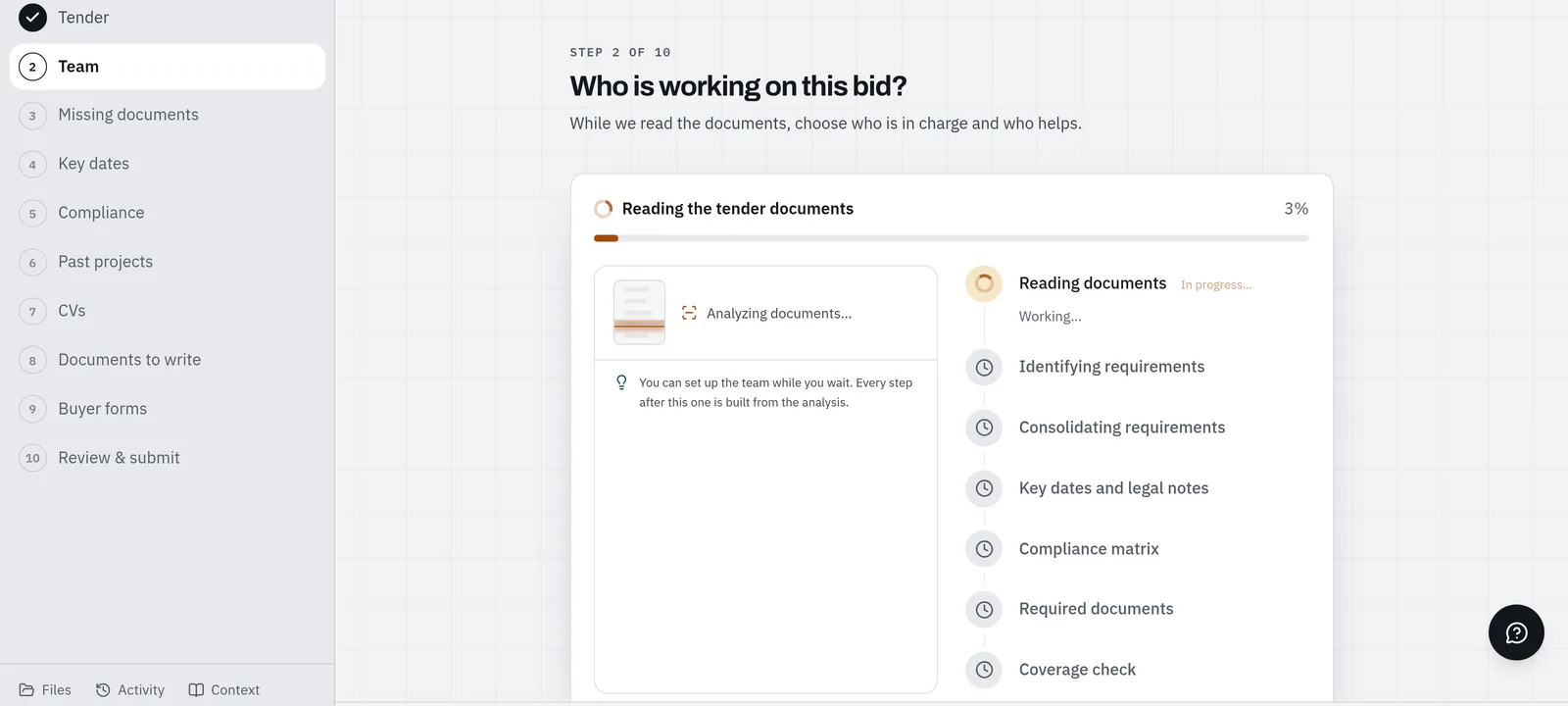 01
Read the package
Tender · Team · Missing documents · Key dates · Compliance
Offra reads every document the buyer published, lists every requirement with the passage it comes from, flags what is missing and every date that can end the bid early.
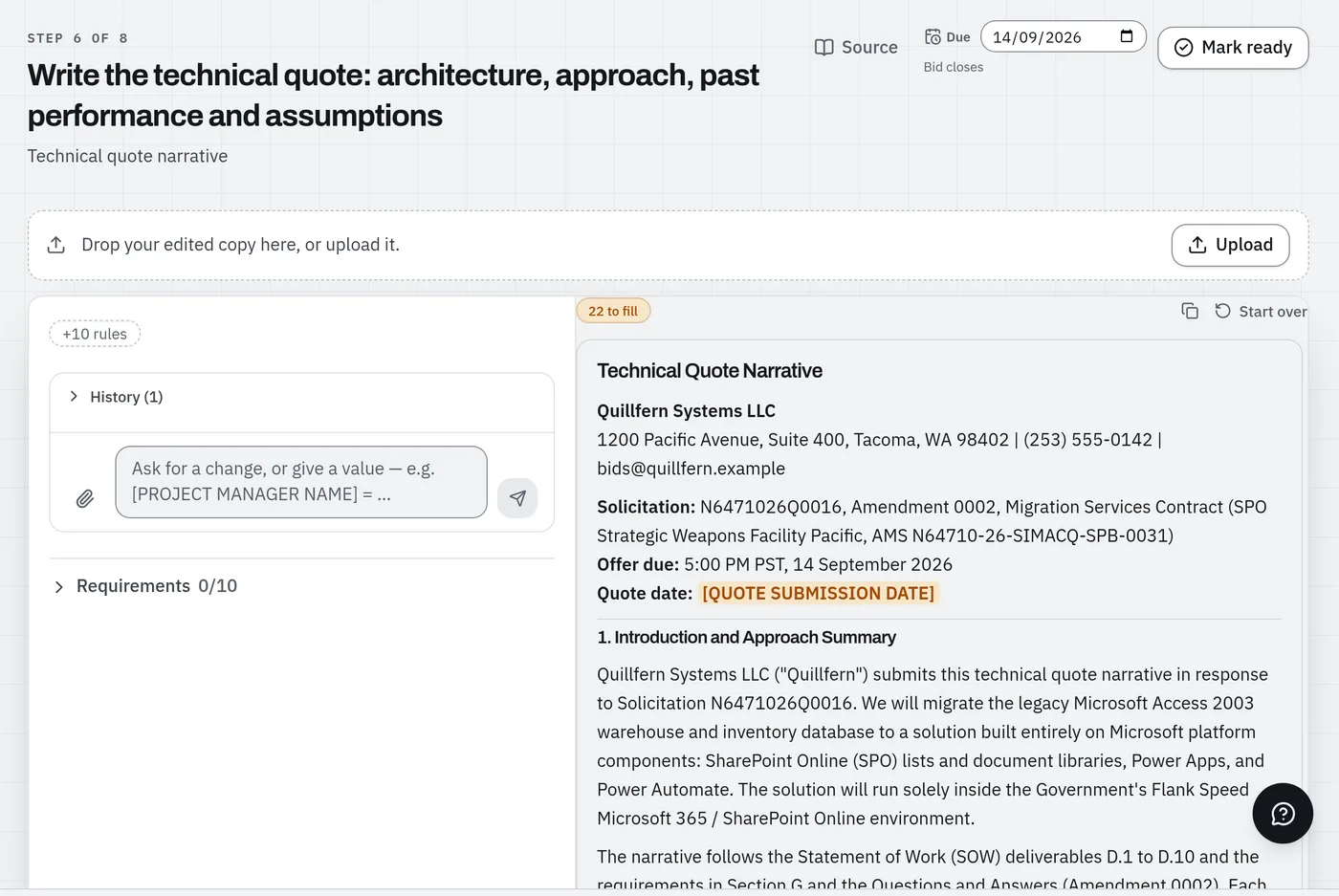 02
Write the documents
Past projects · CVs · Documents to write
One CV per person, one sheet per past project, and each document the tender asks for, written from the tender and your knowledge base. What only you can decide stays a blank, and your price is never written.
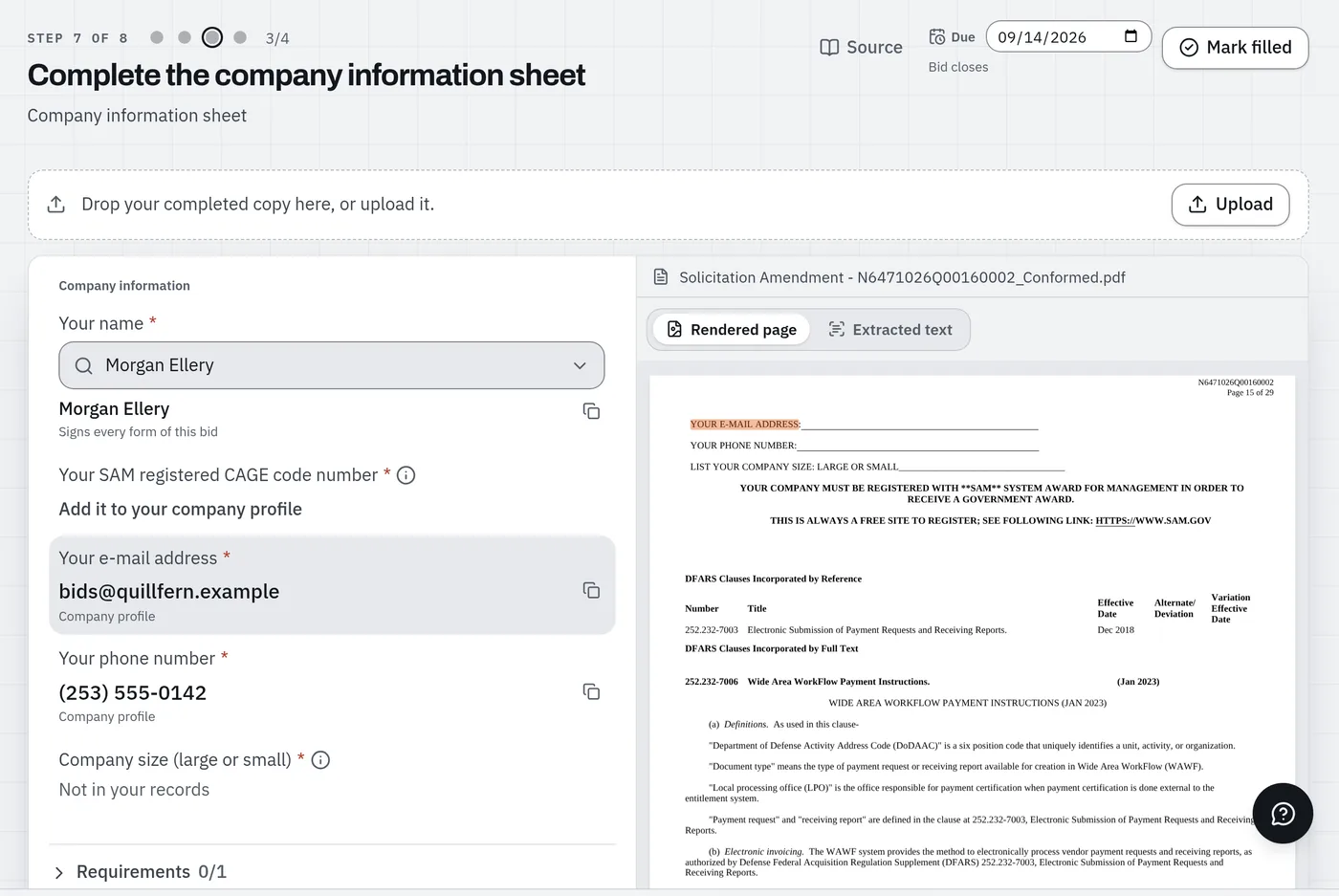 03
Fill the buyer's forms
Buyer forms
Every field of the buyer's own forms, with the value to copy from your profile and knowledge base, beside the form itself.
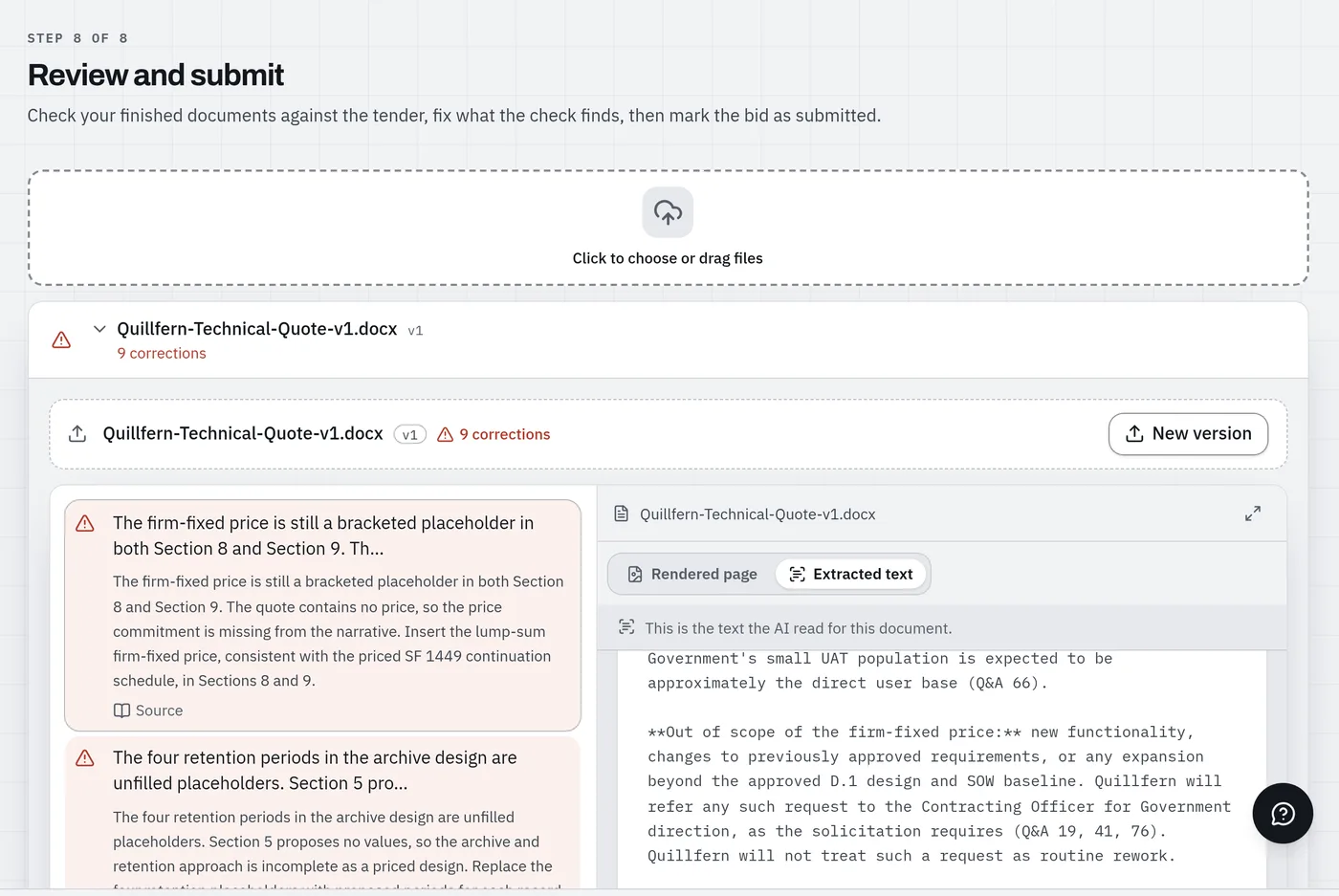 04
Check before you submit
Review & submit
Drop your finished response and Offra checks it against the tender: each correction points at the passage it breaks.
One bid: $149, or $99 during your trial and on any plan. Business includes bids every month.
Start free and open the sample bidEvery account has a sample bid in the app: a fictional firm's bid, every step filled in. The full walkthrough →
Frequently asked questions
Is there a free trial?
Yes. Every free account starts with a 14-day trial of every Business feature for deciding which tenders to answer: the bid report on every notice (go/no-go, win chance, competitors and past awards, the buyer's record), your For you list, Describe a search and export. No credit card, and nothing to cancel: when the trial ends, your account stays free, with no time limit, to search every open bid and get daily alerts. Bids are not part of the trial. A bid is the work on one tender: Offra reads the whole package, writes the documents, lists the buyer-form values and runs the final check. When a tender is worth answering, buy that one bid, with no subscription, and it costs less during the trial. A sample bid in the app shows every step before you buy one. To keep the trial's features after it ends, choose Intelligence; if you answer more than two tenders a month, choose Business, which includes bids. Both are month-to-month, cancel anytime — your account then stays free, with everything in it — and if you switch to annual within 30 days your first month is credited. Prefer to talk it through first? Book a demo on a tender you're actually bidding.
Is my data secure and kept private?
Yes. Your documents stay yours — access is scoped to each firm's workspace, and you can request deletion at any time. We host on enterprise-grade infrastructure in the United States; see below for exactly where your data lives.
What file types are supported?
Upload your tender documents and your estimate as PDF, Word or Excel.
Which tenders can Offra read?
Any of them. Upload the tender documents and Offra reads them whatever the sector, the level of government, or whether the buyer is public or private. The Opportunity Radar — which finds tenders for you — covers open public notices across sectors, and decides per firm what counts as your kind of work by reading each notice against your specialties and past projects.
Do I need past bids to get started?
No. No historical bid packages or templates required — just drop in the documents for the tender you're working on and your estimate.
What happens if I go over my plan limits?
Past its allowance, Business buys extra bids one at a time — the price is on the pricing page — with no plan change. On Intelligence and the free account every bid is bought the same way. If you need more than Business allows, Entreprise covers it — just talk to us.
Where is my data hosted?
Your account, tender and bid data is stored in the United States, on enterprise-grade cloud infrastructure. This website, our email service and our AI processing run on U.S. providers — our Privacy Policy names each one and says exactly what it handles.
What AI does Offra use, and will my data be used to train it?
Offra runs on current frontier reasoning models, and we re-evaluate and upgrade them continuously as the technology evolves — the space moves fast, and so do we. Privacy comes first: your data is never used to train AI models — ours or our providers'. We reach those models through a router that we restrict, on every single request, to providers operating under zero data retention who do not train on what is sent to them — so this is enforced by how the request is routed, not only promised in a contract. We continue to work toward self-hosted open-source models so that, where privacy matters most, your data never leaves infrastructure we control. Our Privacy Policy names every provider we use today.
Where do the procurement figures on your site come from?
Every figure comes from public procurement records. Open tenders come from SAM.gov federally, plus state solicitation portals. Past awards — who won, who lost and at what price — come from those same registries plus USAspending and the state award portals. We count the winning and losing bids those registries publish, and the numbers on this page update on their own as new tenders appear. Client documents are never part of these figures and are never used to build our benchmarks. What you upload stays in your workspace and is used for one thing: reviewing your bid.
Can Offra write our answers — and will it make up numbers?
It writes them, and it does not make up numbers. On the Business plan — and on every bid you buy — Offra writes the documents a bid asks for: one CV per person, one sheet per past project, and documents such as a methodology or a cover letter, from the tender, your knowledge base, your company profile and your instructions. Anything only your company can decide, such as a name, a start date or your own resources, is left as a blank like [PROJECT MANAGER NAME] for you to fill. Your price is never written for you: every amount is checked against what Offra read and what you typed, and one found nowhere is replaced by a blank. On the buyer's own forms, Offra lists the value to copy into each field; it never writes into their file. You review everything, and you submit the bid.
Win more public tenders, with a fraction of the effort.
Upload your first tender and get a review-ready checklist of requirements, gaps and deadlines in minutes.
Free account: search every open tender, with the go/no-go on every notice for your first 14 days. Pay only for the bids you answer.