Paste a 200-page tender into ChatGPT, ask for a compliance matrix, and a minute later you have one. It has columns, a requirement on every row and page numbers down the side. It looks like the work is done.
It may even be mostly right, and that is the problem. A matrix that is right on nine lines in ten does not tell you which line is wrong, and it does not tell you what it left out. The one mandatory form it skipped is the form that gets the bid rejected, and nothing on the screen says it is missing.
Offra uses large language models too, so this is not an argument that our model is smarter. It is an argument about method. A model asked to read everything at once and answer from memory produces a different kind of result from one that reads in small pieces, copies the exact words, and has every line checked against the document by code that cannot make anything up. This article explains that difference twice: first in plain terms for the person deciding whether to trust a tool, then in detail for the team that has to verify it.
Key takeaway: a compliance matrix is only useful if every line can be traced to the page it came from and nothing is silently missing. A single prompt gives you neither guarantee. The model is not the difference. What surrounds it is.
What a compliance matrix has to do
A compliance matrix is the list of everything the tender obliges you to do, one line per obligation. Each line answers four questions: what is required, where the tender says so, whether missing it disqualifies the bid, and what you have to hand in to satisfy it.
Two properties make it worth having. It has to be complete, because the obligations that sink bids are rarely the obvious ones. They are the signed form in an appendix, the wording of the bid bond, the insurance certificate named once on page 140. The five documents that sink a public tender are almost all of this kind. And it has to be traceable, because a line you cannot check is a line you have to confirm by re-reading the tender, which is the work the matrix was supposed to save.
Three ways the one-prompt shortcut fails
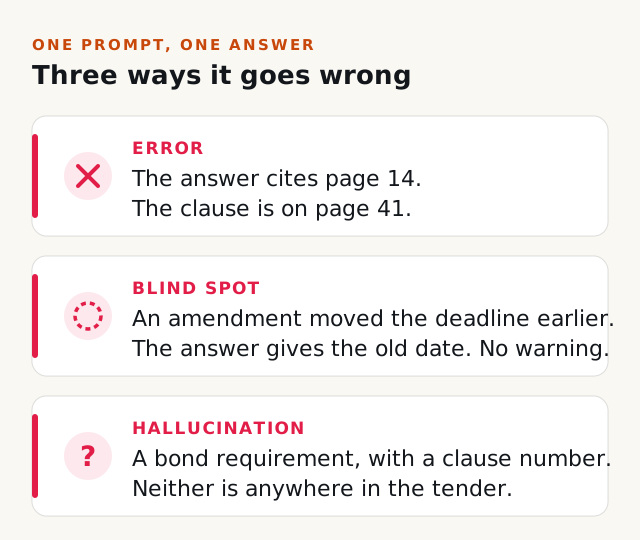
It summarizes instead of listing. Asked for every requirement in a very long document, a language model tends to compress. We saw it in our own pipeline before we changed it: an 86-page RFP handed to a model in a single request came back as one requirement, a tidy roll-up of the whole document. Nothing about that answer looked broken. It was a summary where a list should have been.
It has blind spots, and it does not report them. An amendment issued last week may have moved the closing date earlier. Pages in the middle of a long document tend to get less attention than the beginning and the end. When part of the tender was never really read, the answer does not say so. The matrix just comes back shorter than it should be, and a short matrix looks exactly like a complete one.
It fills gaps with plausible text. This is what people mean by hallucination. A model that knows tenders of this kind usually demand a performance bond may list one, with a clause number, when this tender demands nothing of the sort. Page numbers are the easiest case to see: the model reads text, not pages, so unless something outside the model checks it, a page reference in the answer is just more generated text.
What Offra does instead
The method comes down to four ideas, and none of them needs a technical background to follow.
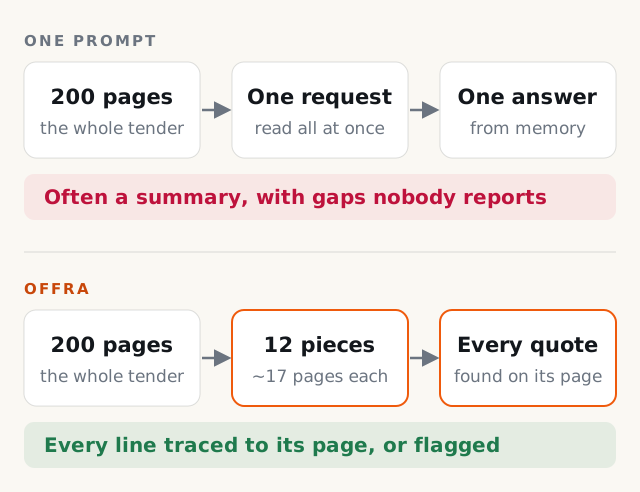
- Read in pieces small enough to list. A long document is cut into overlapping pieces of about seventeen pages, and each piece is read on its own. Given seventeen pages, a model lists what it finds. Given two hundred, it tends to summarize.
- Make the AI copy the exact words. Every requirement has to come with a short verbatim quote: the sentence in the tender that actually states the obligation.
- Check every quote in code, not by asking the AI. Software that cannot invent anything searches the document for each quote and finds the page itself. The page number the AI reported is thrown away.
- Say what could not be done. A quote that cannot be found is labeled as such. A file that could not be read is named. Nothing incomplete is presented as complete.
The result is still a first pass, and your team still makes the call. But it is a first pass you can check in seconds per line, with the uncertain lines already marked. That is the difference between a matrix you can rely on and one you have to redo.
Four questions to ask any AI tool
Whatever tool you evaluate, ours included, these four questions separate a matrix you can rely on from one that only looks finished:
- Can I click from each line to the exact passage it came from, highlighted on the page?
- When the tool cannot find the passage it quoted, does it say so, or does it show a page anyway?
- Does it tell me which files it could not read?
- When an amendment changes the closing date, does it work out which date is in effect?
A tool that answers yes to all four has been built around its model's weaknesses rather than on top of them. The rest of this article shows how that works in Offra, for the readers who want to check.
For the technical team: the whole pipeline
This part is for the people who have to confirm that a tool really reads a 200-page tender, not just that the demo looks good. Everything below describes how the analysis works today.
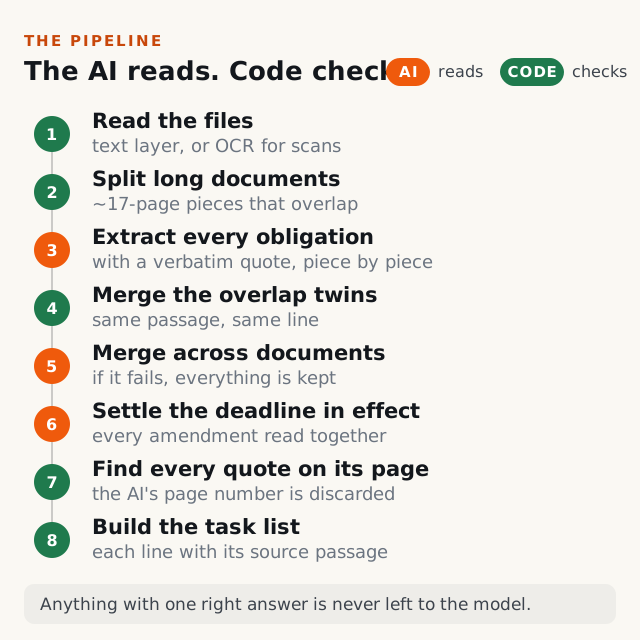
The pattern to notice is the alternation. The AI does the reading and the judgment: what counts as an obligation, what it asks for, whether it disqualifies. Code does everything that has one right answer: where a sentence sits in a document, which two lines from overlapping pieces are the same line, which page a quote is on. Wherever a step can be done deterministically, it is not left to the model.
How the files are read
PDFs are read from their embedded text. A scanned PDF, and any image, goes through OCR. Word documents are converted with their headings and tables intact, and spreadsheets become one table per sheet with their number formats kept, so a 5% retainage stays 5% and a price keeps its currency. In PDFs, running headers, footers and table-of-contents lines are stripped before anything is extracted, so a header printed on every page is not read two hundred times.
For every document you can open the exact text the AI read. If OCR misread a page, you see the misreading the AI saw, not a clean page image that hides it.
How a 200-page document is split
A document of up to about 40,000 characters, roughly seventeen pages, is read whole in a single request. Anything longer is cut into pieces of that size, at a paragraph or line break rather than in the middle of a sentence. Each piece starts with the last 3,000 characters of the piece before it, about a page of overlap, so a clause that straddles a cut appears whole in at least one piece.
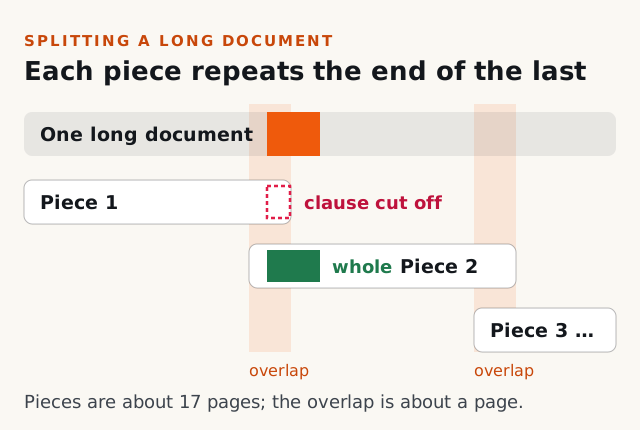
A 200-page document therefore becomes about a dozen pieces, and the pieces from every file in the tender are read in parallel. Each piece carries a short header with the document's name and its outline, so section references stay consistent from one piece to the next. The header is marked as context only. The model is told never to extract from it or quote it, and because it is not part of the document, a quote copied from it would not be found by the check described below. Spreadsheets too large to read whole are split by ranges of rows, with the header row repeated at the top of every piece so each one knows what its columns mean.
What is extracted from each piece
For every obligation in its piece, the model fills in a structured entry, not a paragraph of prose:
- a one-line statement of the obligation, its category, whether it is mandatory, and whether missing it disqualifies the bid
- when it applies: at the time of the bid, after award, or during the contract
- the document to attach, if there is one, the concrete action to take, and who produces it: the bidder, a surety, a government registry, a laboratory or the buyer
- the section reference, and a verbatim quote of up to 200 characters, copied as one continuous passage and never stitched together from two places with "[...]"
Obligations are recorded at the level of what you hand in. A price schedule to fill in is one requirement, not one per line item. A bid bond is one requirement, not one per condition the bond must meet. The model is told to ignore tables of contents and bare headings and to take each obligation from the paragraph that states it, and a code filter removes any table-of-contents line that slips through anyway. Dates and legal clauses are extracted in the same pass, each with its own verbatim quote.
How duplicates are merged
Overlapping pieces produce twins: the same obligation read twice from the shared page. Code folds them together when their quotes land on the same stretch of the document, when one statement contains the other, or when the wording is nearly identical. This merge happens only within one document. At this stage, the same obligation stated in two different documents stays as two lines, because each may need its own submission. When twins merge, the stricter reading wins: if either one marked the obligation mandatory, or due at bid time, the merged line does too.
A final AI pass then looks across documents and decides which of those pairs really are one obligation. It recognizes when a requirement in the main RFP and a form in an annex are the same thing in different words, and it removes lines that only point elsewhere, such as "see Annex 3". This pass fails safe. If it errors, or if the tender has more than 300 requirements, it is skipped and every requirement is kept as it was.
How every line is checked against the source
This is the step that deals with hallucination, and it is done entirely in code.
The model never sees a page number, because it reads text, not pages. So whatever page it reports is discarded. The software searches the document for the verbatim quote instead, and records how it found it. It tries the strictest match first and steps down only when it has to, and the badge on each line says which step it reached.
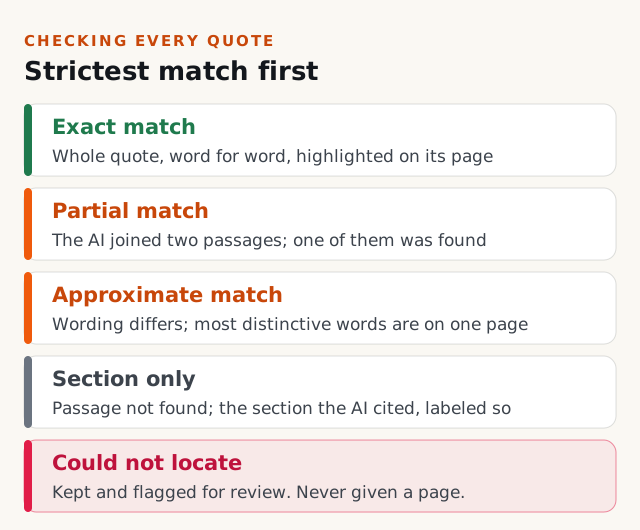
- Exact match. The whole quote was found, word for word. The page opens with the passage highlighted.
- Partial match. The model joined two separate passages. One of them is located and shown, and the badge says the quote was not continuous.
- Approximate match. The wording differs slightly from the document, but most of the quote's distinctive words sit together on one page. The badge gives that page and says the location is approximate. Nothing is highlighted, because highlighting a guess would point at the wrong words.
- Exact passage not found. The quote could not be found, so the section the model cited is shown instead, labeled as where the AI says the passage comes from rather than as a confirmed location.
- Could not locate this passage. Nothing matched. The line stays in the list, and it is never given a page it did not earn.
Two details matter for trust. Quotes too short to be distinctive, such as a bare "Signature:" on a form, are never matched, because a match on a phrase that appears a dozen times is as likely to be wrong as right. And a line that could not be located is not quietly deleted. A hallucinated requirement shows up exactly this way, as a line whose words the software could not find in the tender. It is the first thing a reviewer should look at, and it is marked so they can.
How amendments and deadlines are handled
The closing date is the one fact every bid depends on, and amendments are where it goes wrong. So one step reads the opening of every document in the tender together, amendments included. When the combined text is too long, the longest documents are trimmed first, so a one-page amendment never loses a word to a 300-page specification.
That step decides which closing date is in effect from what the documents say, not from which date is latest, because an amendment can move a deadline earlier as easily as later. The date it replaced is not deleted. It stays visible, struck through, so nobody works to the old one. Today this reconciliation covers the closing date. Other changes an amendment makes are extracted from the amendment itself and cited to it.
What Offra tells you it could not do
A document that could not be retrieved, could not be read, or timed out is listed under Documents not analyzed, each with its reason, and the analysis is described as incomplete. Our team is notified, and there is a one-click retry. If the same file fails a second time, you can remove it and carry on without it. And a run that produces no extractions at all fails loudly rather than presenting an empty matrix as a clean result.
Where the matrix ends up
The obligations you have to act on become tasks in the tender file, each carrying its verbatim source passage and its badge, and the documents you have to hand in are grouped under Documents to produce. The coverage check then compares the requirements with your company profile, past projects and certifications, and marks each one covered, partial, conflict or missing.
What this does not claim
Offra is not the last reader of your tender. It is a first pass built to make the human review fast and pointed, with the uncertain lines marked on purpose. The AI step is still an AI step: it can miss an obligation or misjudge one. What the method guarantees is not that nothing is ever wrong. It is that the lines you cannot verify say so, and that the files it could not read are named. OCR can misread a poor scan, which is why the text the AI read is always one click away.
Your documents are sent to our AI providers only to produce the analysis you asked for, and they are never used to train AI models, ours or our providers'. The details are in our privacy policy.
How to test it on a tender you already bid
The fastest way to judge any of this is on a tender your team already knows well:
- Upload a tender you bid recently, with its amendments.
- Compare the mandatory requirements Offra lists with the ones your team tracked, and look for anything missing in either direction.
- Open twenty lines at random and follow each one to its source passage.
- Read every line marked approximate, section or could not locate, and check what the tender actually says.
- Check the closing date against the last amendment.
- Open the extracted text of a scanned document and see what the AI actually read.
An hour of that tells you more than any demo. It is also the review Offra is designed to make short.
Related reading: why Offra shows you what it is unsure about, how to read instructions to bidders before anything else, and what the tender analysis covers.