
SAM.gov is the official record of federal contracting, and it is free. Every federal notice in Offra comes from it, and we copy it every day. So the honest question is not whether to use Offra instead of SAM.gov. It is what you get on top of it, and whether that is worth creating an account.
This post answers that in two parts. First, what the free account does that SAM.gov does not, and where SAM.gov is simply fine. Then what the paid plans add, side by side, so you can choose one. If you are weighing Offra against other bid software rather than SAM.gov, GovDash, Sweetspot, Loopio and Responsive are compared in their own post.
Key takeaway: SAM.gov tells you what federal buyers published. The free Offra account adds state and city boards, a readable version of every notice, a check of your size under its code, a bid/no-bid checklist and reminders before its deadlines. Paid plans do that work for you, and Business adds the judgement: which bids to chase, and how to price them.
What SAM.gov does well
Start with what you should keep doing there.
- It is the authoritative notice. When Offra's copy and SAM.gov disagree, SAM.gov is right. Every federal notice in Offra links back to it.
- Your registration lives there. Your entity registration and your UEI belong to SAM.gov, and Offra does not replace them. What registration does and does not cover is a subject of its own.
- Its alerts work. With a SAM.gov account you can save a search and get a daily email when its results change, follow a notice, and join a notice's Interested Vendors List. All of it is free.
If every bid you make is federal, and you already read each notice in full, those tools cover a lot. The rest of this section is about where they stop.
Where the free account picks up
Everything in this section is on the free account, with no card and no time limit. A good part of it is also on the public tender portal, with no account at all.
Federal, state and city work in one search
SAM.gov carries federal notices only, because that is its job. A lot of public work never goes near it. Offra puts these boards in the same search as SAM.gov:
- Texas's Electronic State Business Daily and the TxDOT lettings.
- eVA in Virginia, WEBS in Washington, PASS in the District of Columbia and Cal eProcure in California.
- The three largest metro boards: New York City, Los Angeles and San Francisco.
- City and agency boards that run on OpenGov: Seattle, Phoenix, Orlando, Norfolk, DC's Department of General Services, Nashville's WeGo and 1GPA.
Here is one search on a free account: building construction and renovation, spare parts hidden, closing soonest first. The first three results come from three different boards: Texas's state board, San Francisco's and SAM.gov's.
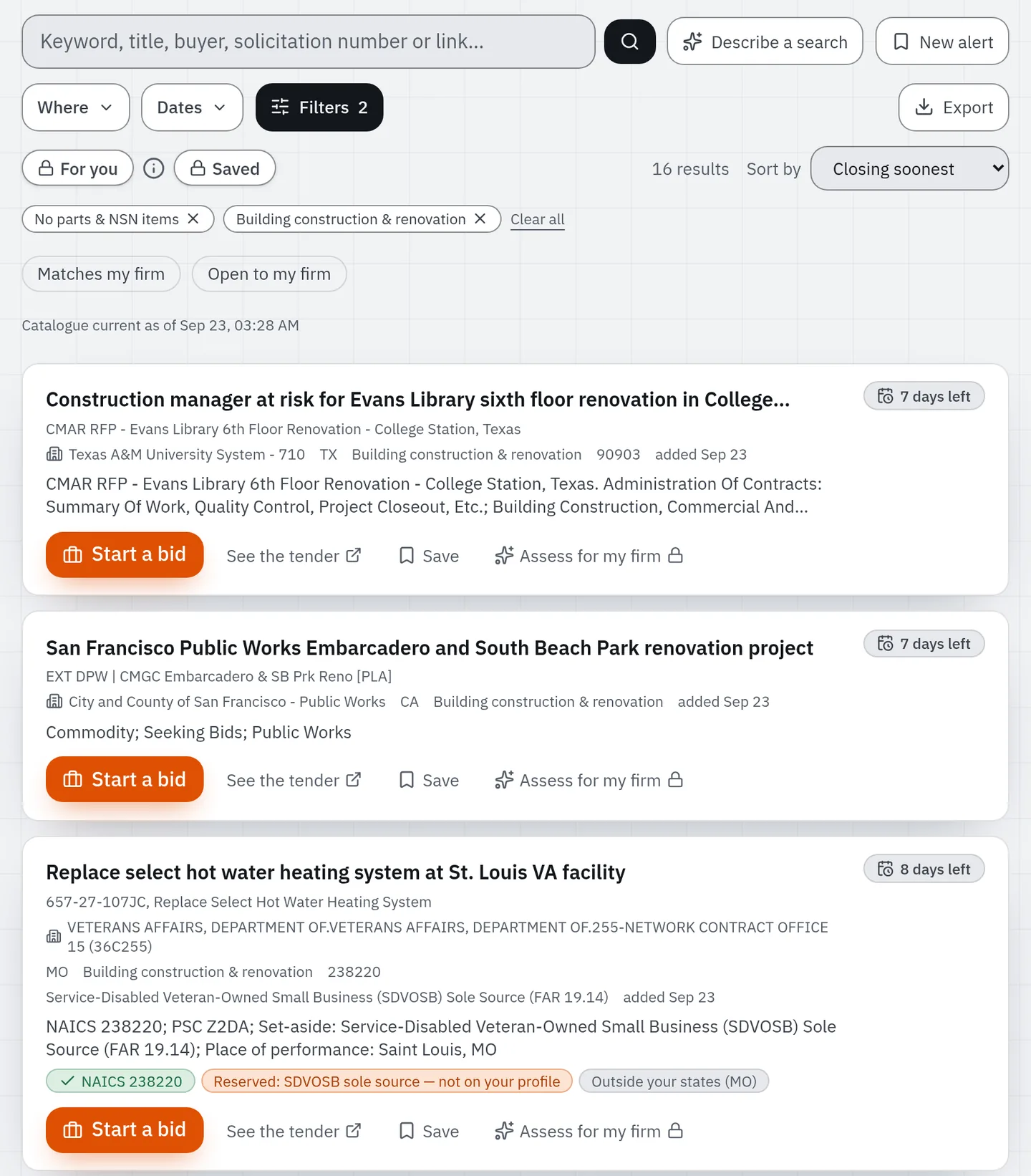
Every board names its notice types differently. Offra sorts them into four: open for bids, coming soon, market research and announcement. So "market research in Virginia" is one filter across federal, state and city notices. Market research is the type to watch, because it is the buyer asking the market how to write the requirement. Here is how to answer a Sources Sought notice.
One limit to know about: most state and city feeds publish no set-aside, no classification code and no attachments. When a board leaves a field out, the notice says "not in this feed", not "none".
A notice you can read in ten seconds
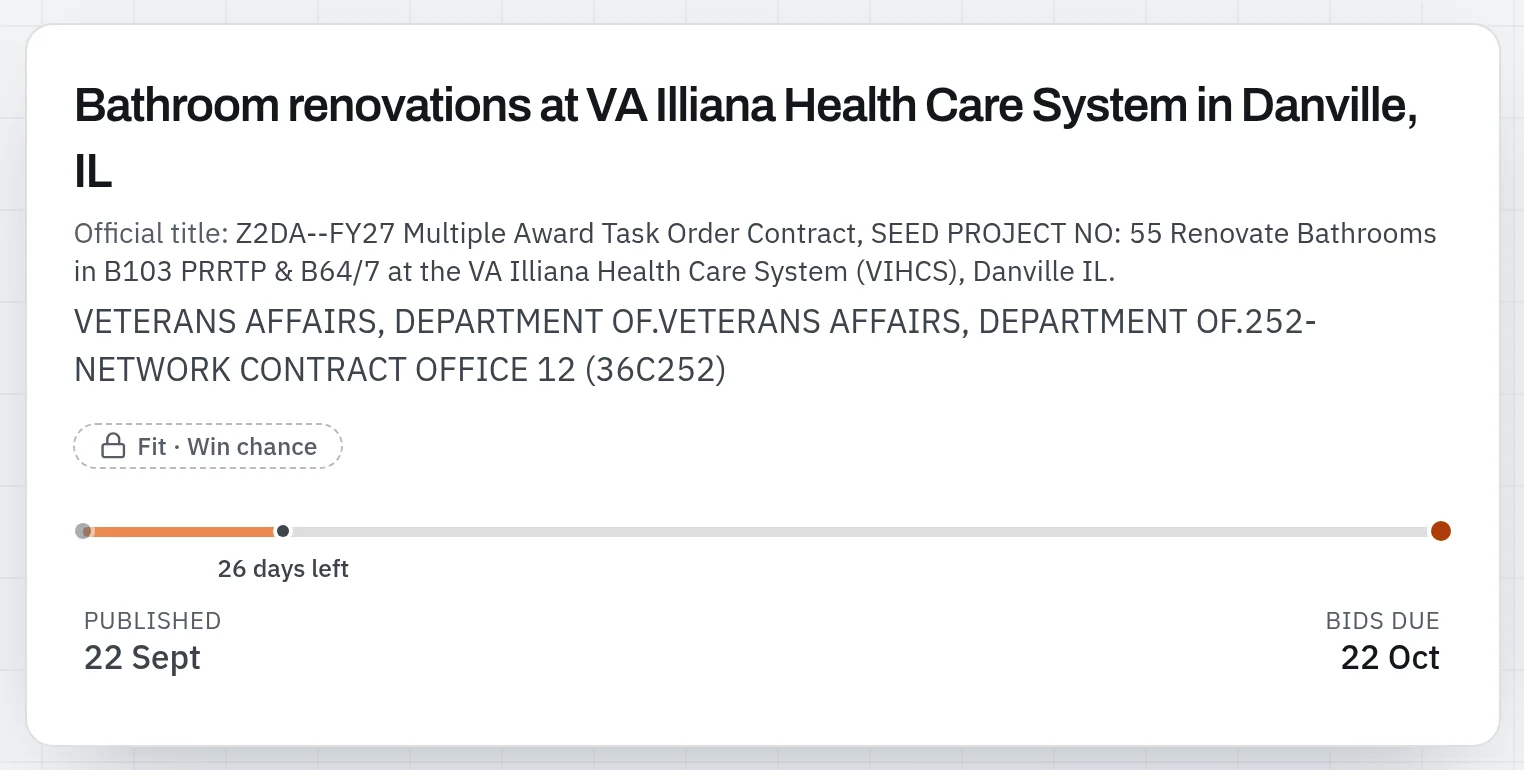
Federal titles are written for a database: 59--COIL,RADIO FREQUENCY, or Z2DA-- followed by a
project number. Offra gives each open notice a plain title and keeps the official one right under
it.
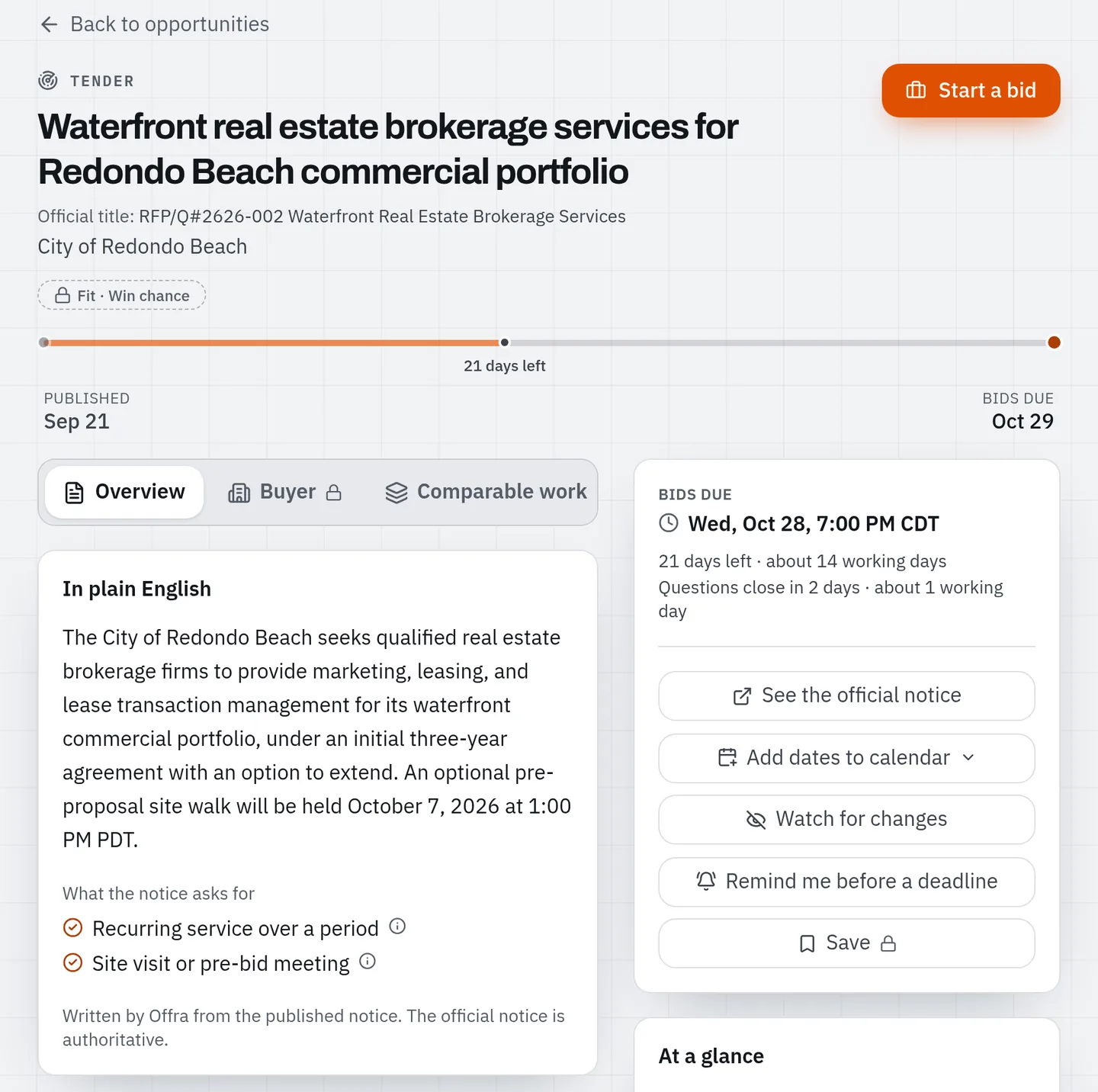
Inside the notice, In plain English gives a two- or three-sentence summary. It also lists what the notice asks for: a bond or bid guarantee, a security clearance, a site visit or pre-bid meeting, a licence, an IDIQ or BPA vehicle, a recurring service, an incumbent, a brand name. A requirement is listed only when the notice's own words state it, and those words are one click away.
Every notice also gets a type of work from 35 categories, such as Roofing & building envelope or Janitorial & custodial. That includes the roughly 40% of open notices that publish no NAICS code, which no code filter can find.
Filters for the questions you actually ask
SAM.gov's filters are good at codes and agencies. Offra's add the questions a small firm asks first:
- Hide spare parts & NSN items. One click removes the federal spare-parts and supply buys, which make up about half of SAM's open notices.
- Leave out notices that state a bond, a security clearance or a site visit. "Janitorial in Virginia, no bond" becomes a filter, not an afternoon of reading.
- Open to my firm hides the notices reserved for a set-aside program your profile doesn't list. A firm that holds only small business stops seeing 8(a), HUBZone, SDVOSB and WOSB set-asides. It never hides a notice that has no set-aside.
- Where the work is, not where the office is. In our copy of SAM, only about a third of notices publish a place of performance. For the rest, the only location on record is the contracting office's address. Offra keeps the two apart and labels which one it has. A search for work in Ohio doesn't fill up with supply buys from an office that happens to sit there.
Two shortcuts. You can paste a SAM.gov link or a solicitation number to go straight to the notice. If you don't know your codes yet, the code finder lists the NAICS and PSC codes for a kind of work, each with its SBA size standard and how many open notices use it.
Are we small under this code?
On a small-business set-aside, the first question is whether your firm counts as small under the notice's NAICS code. SAM.gov gives you the code and leaves the answer to you. Enter your average annual receipts or your headcount once. From then on, the free account answers it on every small-business set-aside: small under this code, $12M against a $45M standard, or over the standard.
The size check is part of the quick screen, the Quick triage panel that opens every notice. It sorts the notice's facts into three short lists:
- Can't bid holds only what the notice itself says: it has closed, a mandatory pre-bid meeting has already been held, or it is not a solicitation yet.
- Check first holds what you should confirm, such as a set-aside you haven't recorded or work outside your states.
- In your favour is one line of what works for you.
Nothing about your own profile ever lands under Can't bid. Your profile is what you told us, and SBA rules have exceptions, so a mismatch is something to check, not a verdict.
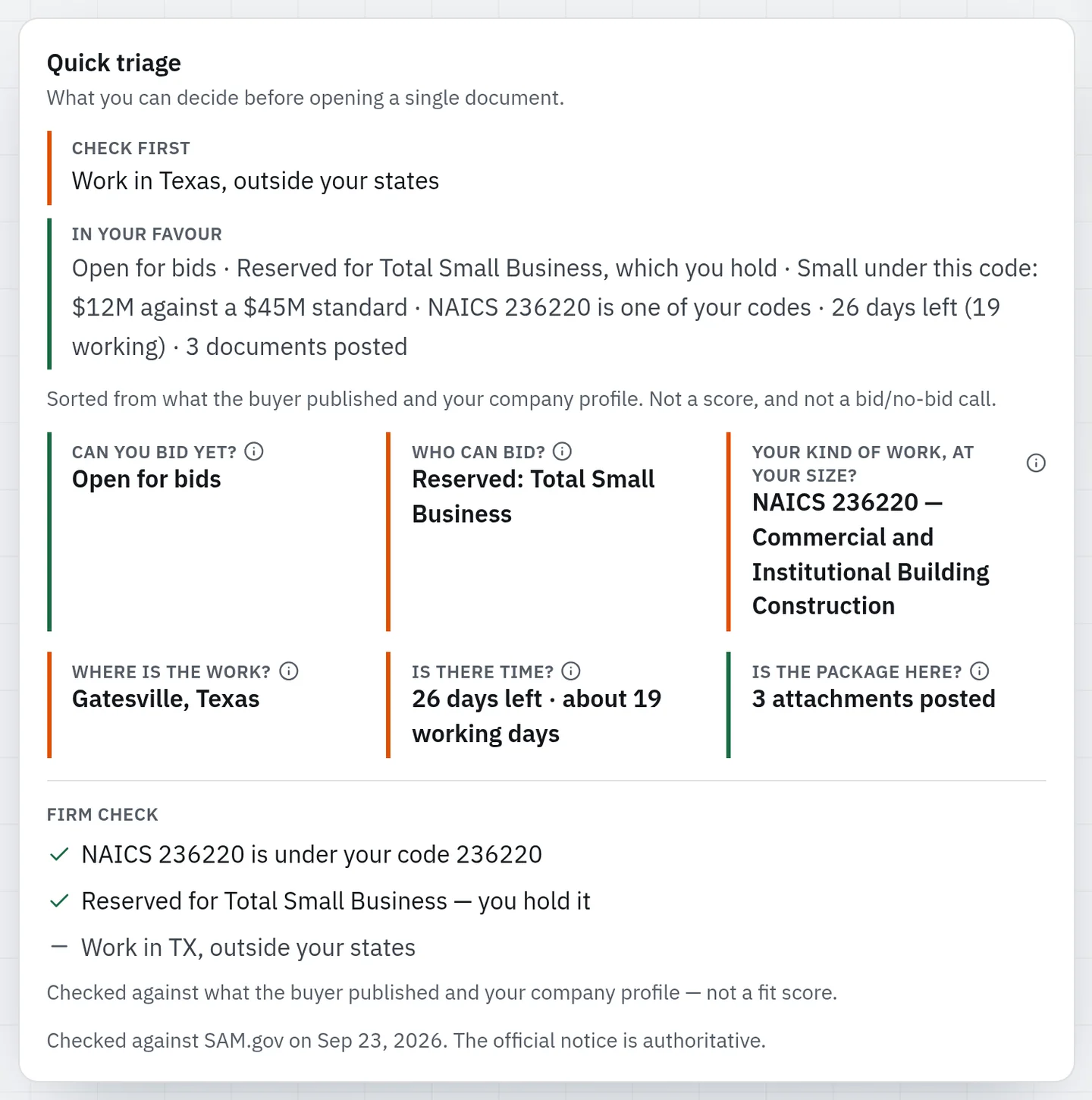
It is a sort, not a score, and not a bid/no-bid call. It is the fifteen-minute kill pass, done for you from what the buyer published.
A bid/no-bid checklist to fill in
Every open notice carries the checklist Offra's own go/no-go runs: 18 questions in six groups. Can we bid? Are we eligible? Can we deliver? Can we meet the terms? Can we win? and Our own history. What the notice settles is filled in already, and your team answers the rest.
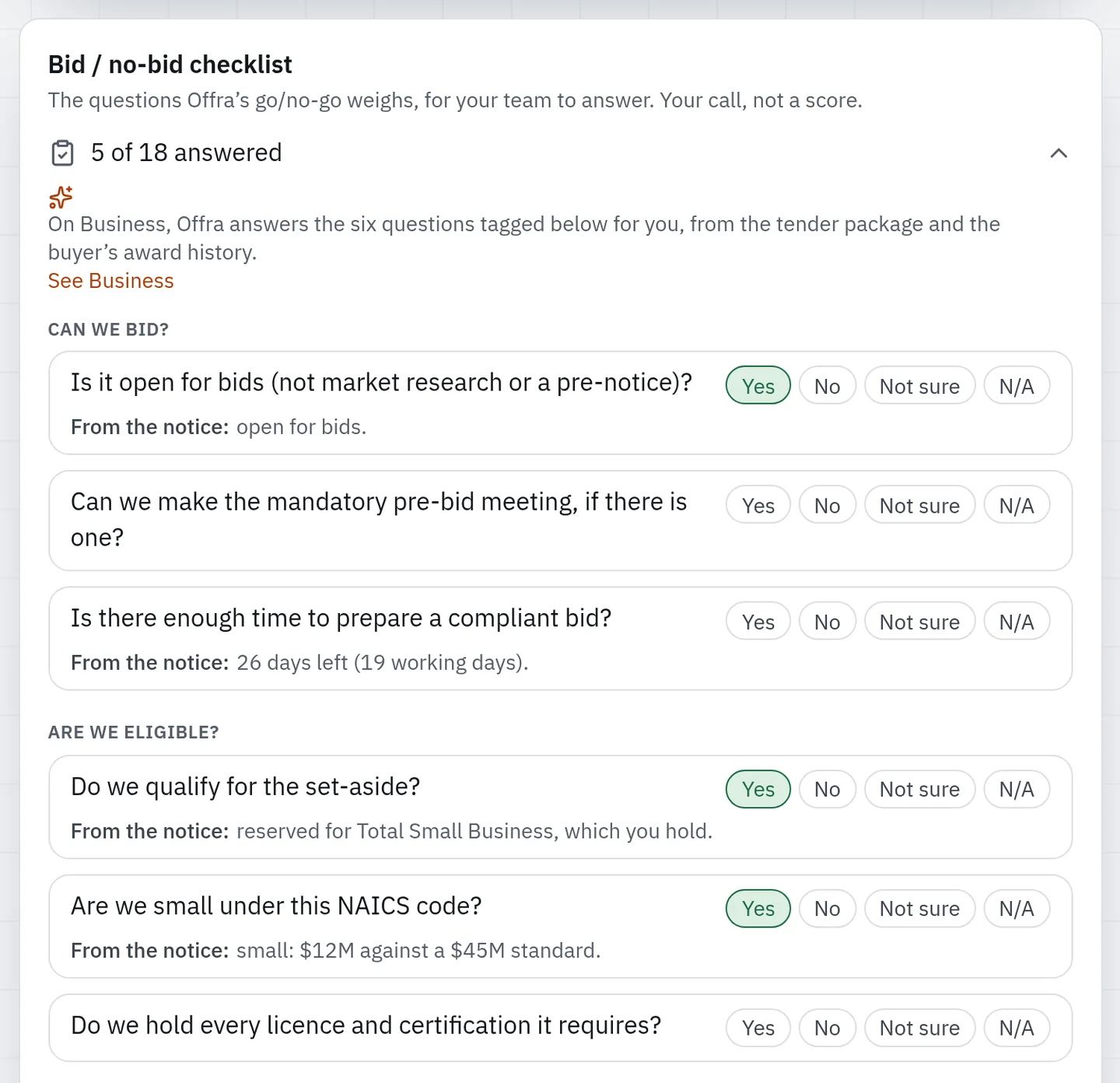
On Business, Offra answers six of the questions itself, from the tender package and the buyer's award history. On the free account those six carry a Business fills this tag, so you can see exactly where a plan would take over:
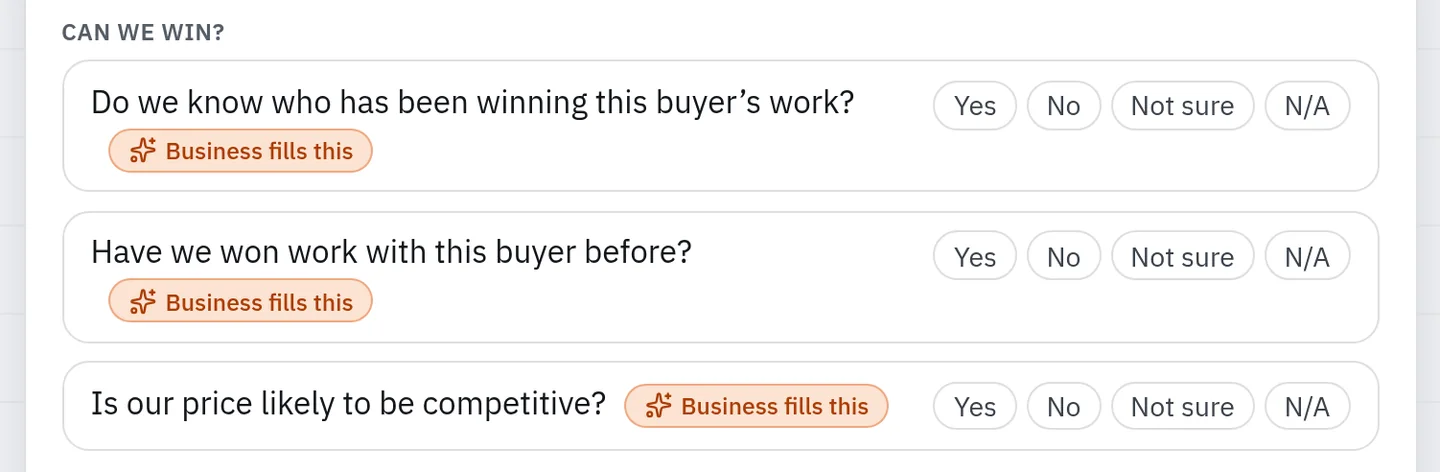
There is no score and no computed verdict. We'll bid starts the bid file, and We'll pass records why. The thinking behind the questions is in making the bid/no-bid call in twenty minutes.
Told what changed, and reminded before it's due
Watch up to 10 notices, and Offra emails you when one changes: the closing or questions date moved, the notice was amended, attachments were posted, or, on SAM, a file was replaced or withdrawn.
That last case is easy to miss. A wage determination can be replaced in place, Rev 27 for Rev 28, and the number of attachments stays the same, so an alert that only counts files would not notice. Offra compares the files themselves and names what went and what came. It checks against its daily copy of SAM, so a change can reach you up to a day after it was posted. What it adds is saying exactly what changed. The package moved after you read it explains why that matters.
Remind me before a deadline covers the other half. Pick the closing, the questions deadline or the pre-bid meeting, 7, 3 or 1 days before, and an email arrives at 8 a.m. in your time zone. If the buyer extends the date, the reminder moves with it. A reminder also watches the notice, so it counts toward your 10.
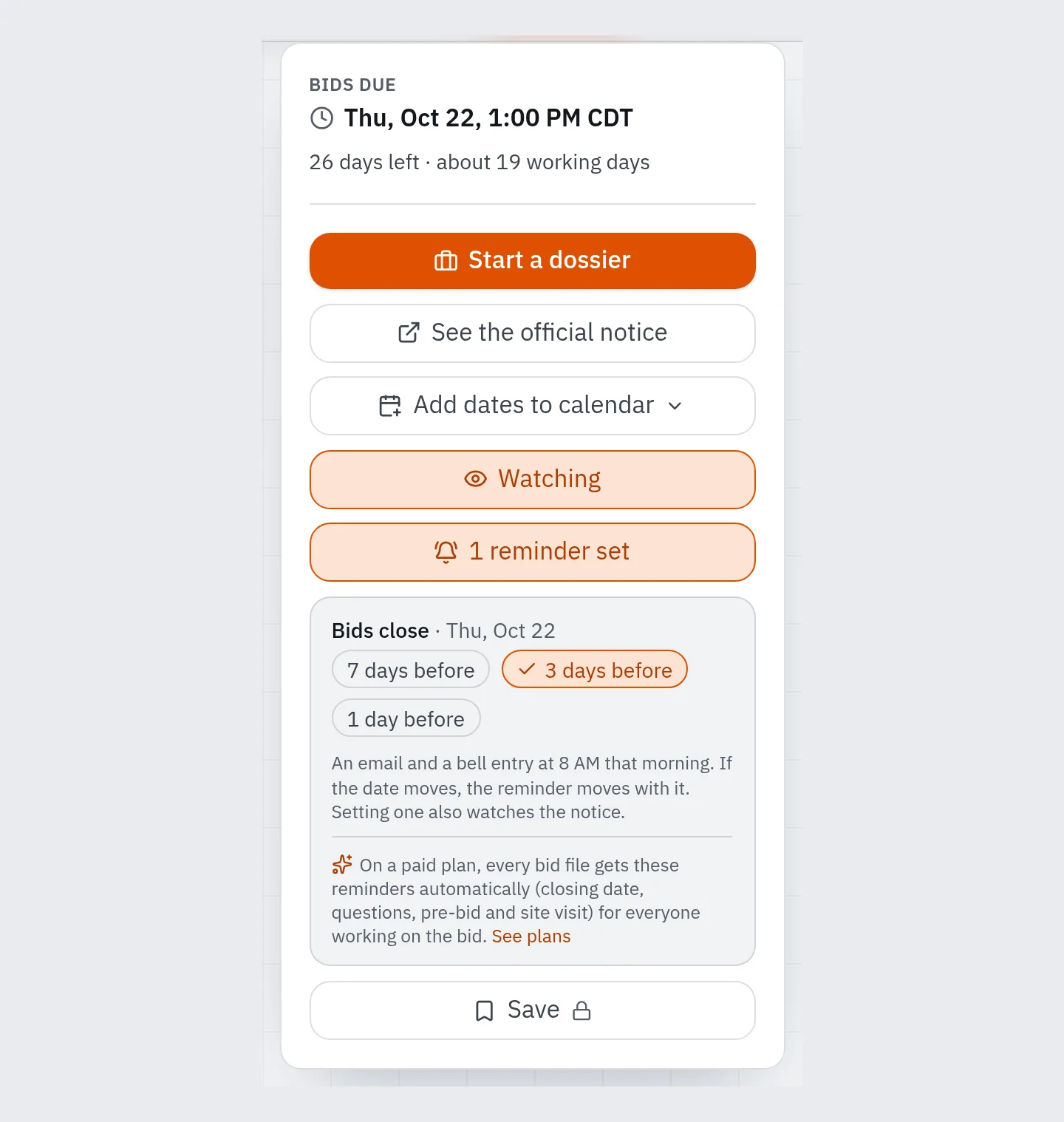
Saved searches are the one place the free account is not ahead. You get 3, on a weekly digest, and SAM.gov's send a daily email. Keep your SAM.gov searches if they suit you. Offra's also cover state and city boards, and the paid plans hold 20, daily or weekly.
How deep the buyer's record goes
Signed in, a notice shows how many past awards Offra holds for its buyer, in a line such as "6,560 past awards on record from this buyer". That tells you whether there is a history to learn from. It is not shown when we hold nothing for the buyer.
Who won those awards, at what price and against how many bidders stays on Business. Federal award records are public too, on USAspending. What Business does is read them per buyer, next to the notice, across federal, state and city ledgers, so you don't have to.
Your first bid is free, on the full Business plan
When a notice is worth bidding, the free account lets you run it on Business at no charge:
- Add a card. Nothing is charged and no subscription starts.
- One tender then runs start to finish with every Business feature: the full reading of the package, the go/no-go and bid report, who has been winning the buyer's work, tasks for your team, drafted answers, the final check, and tracking until the tender closes.
- Up to 10 people can work on it.
The bid file stays in your account for good, and the AI work on it stops a week after the tender's deadline. There is one free bid per workspace and one per card. The card is what makes it one per firm rather than one per email address.
What paying adds
On the free account you do each job by hand. The paid plans do the same jobs for you, automatically, and add the ones only Offra can do.
| Free | Professional | Business | |
|---|---|---|---|
| Open notices, filters, plain titles, quick screen, contacts and attachments | ✓ | ✓ | ✓ |
| Bid/no-bid checklist | You fill it | You fill it | Offra answers 6 of 18 |
| Saved searches | 3, weekly | 20, daily or weekly | 20, daily or weekly |
| Watched notices | 10 | 200, plus saved | 200, plus saved |
| Deadline reminders | Set by hand | Automatic on every bid file | Automatic on every bid file |
| Save notices, CSV export, AI search | — | ✓ | ✓ |
| Tender reading, documents to produce, tasks, final check | First bid | ✓ | ✓ |
| Opportunity Radar | — | 10 matches, weekly | All matches, daily |
| Go/no-go, win chance, pricing guidance | First bid | — | ✓ |
| Who wins the buyer's work | Count only | Count only | ✓ |
| Draft answer | First bid | — | ✓ |
| Addendum tracking on a bid file | First bid | — | ✓ |
| Users | 1 (10 on the first bid) | 3 | 10 |
"First bid" means the one free bid above. Each plan's price and its monthly allowance of bid files are on the pricing page.
The free-account screenshots in this post are real notices, as a free account shows them. The two below show paid features on example data, because a real bid file is somebody's confidential work.
Which one fits
Free fits if you are watching a market, or you bid a few notices a year and want each one readable, checked and on your calendar. It has no time limit.
Professional fits a solo bidder or a small team bidding a handful of tenders a month. Offra reads the whole package and turns it into a requirement checklist and the list of documents to produce. It splits the work into dated tasks for up to 3 people and checks the bid before you submit. The Opportunity Radar brings up to 10 strong or good matches, refreshed weekly.
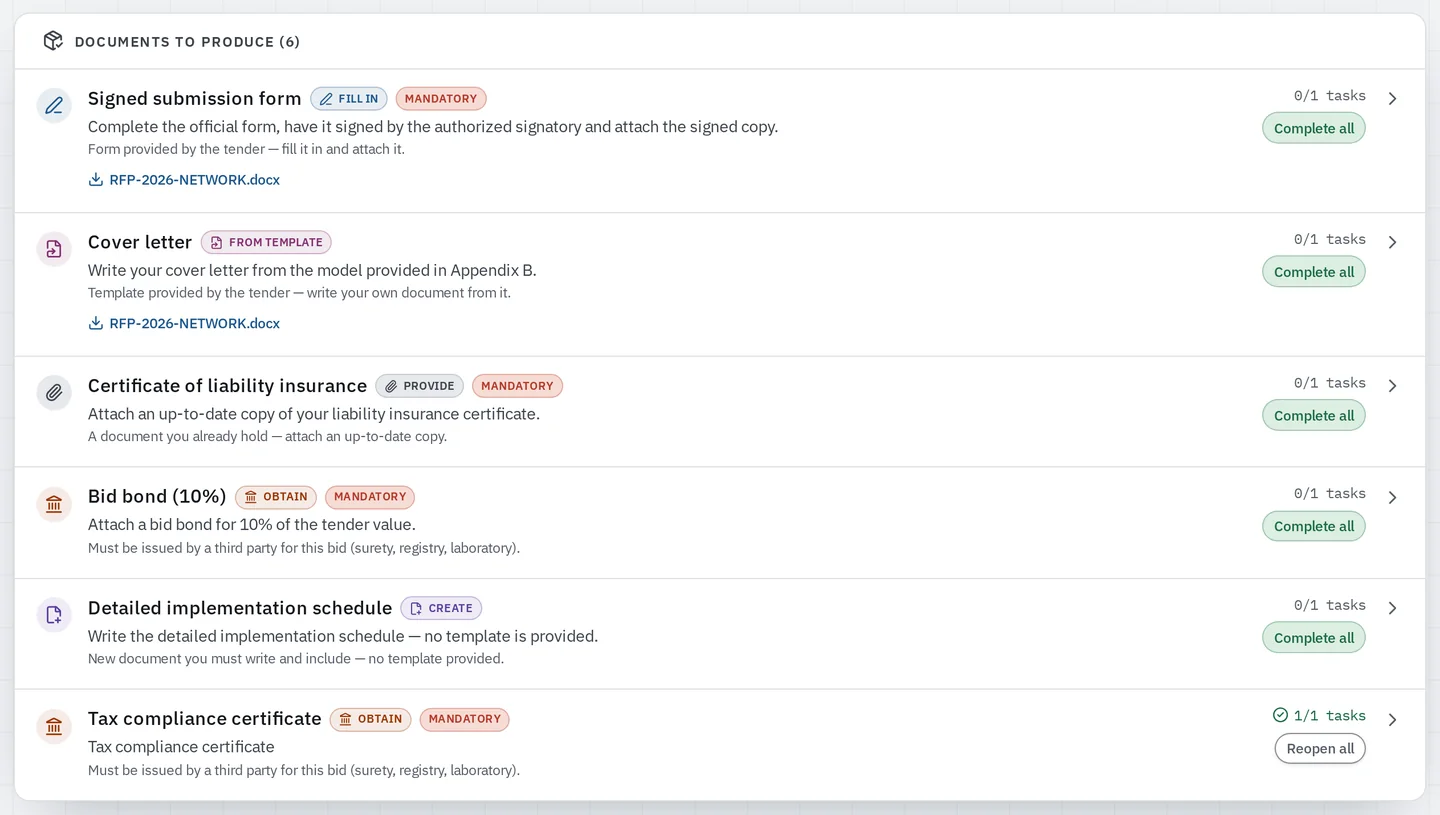
Business fits a team that wants to know which bids to chase and how to win them. It adds the go/no-go with its win chance and pricing guidance, who has been winning each buyer's work, and a radar rebuilt daily with no cap. It also adds Draft answer, for the tasks that are really writing assignments; it never writes your price. Most teams choose Business. If you're not sure, your free first bid is Business, on a real tender of yours.
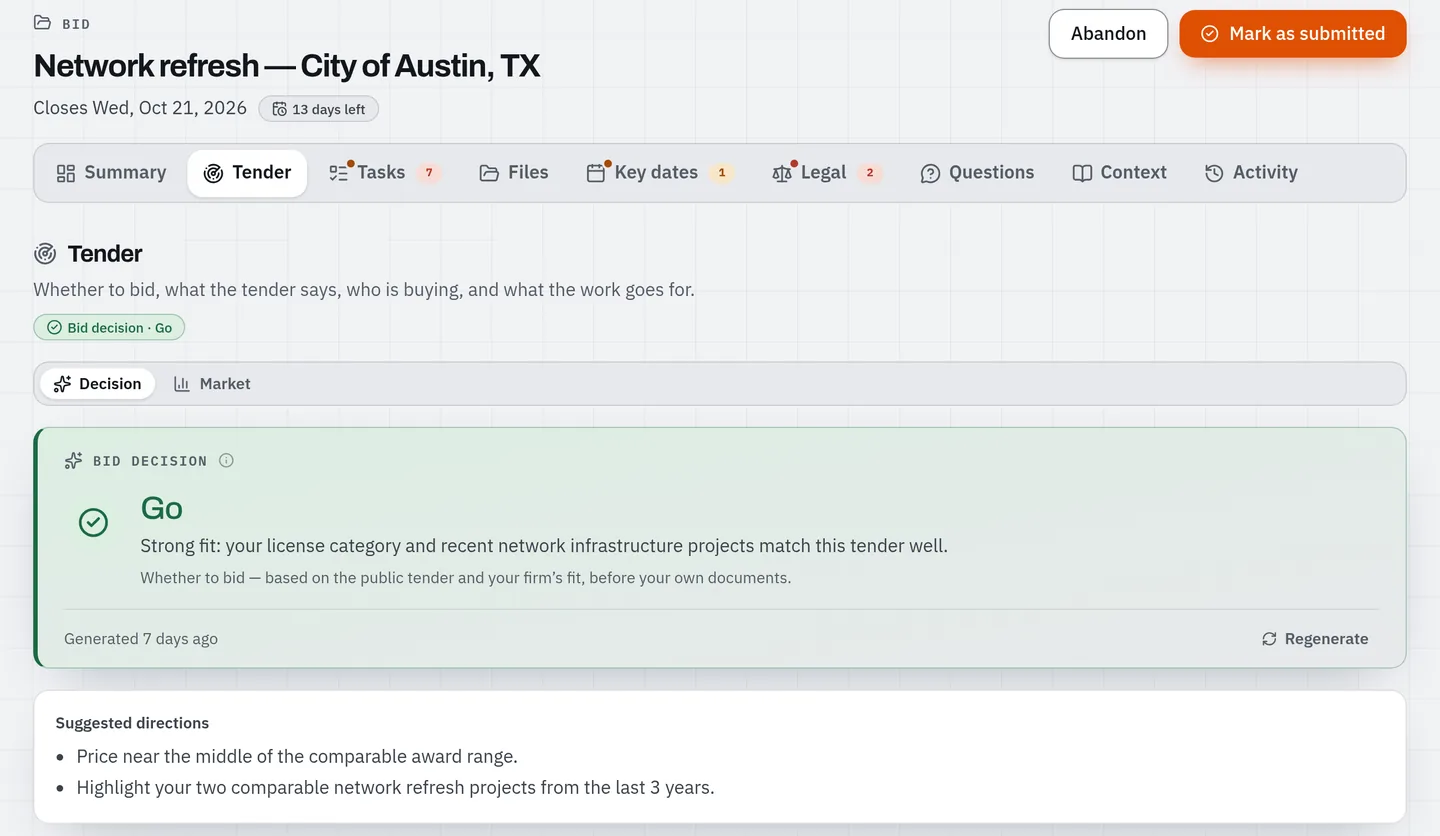
Enterprise is for more users or storage than Business allows, or for SSO and custom integrations. Talk to us.
Paid plans are month-to-month, and you can cancel any time. Switch to annual within 30 days and the month you already paid is credited.
What Offra does not do
- It does not submit your bid. You submit it, on the buyer's own system.
- It does not replace your SAM.gov registration, and it does not overrule the official notice.
- It is not a real-time feed. It checks a daily copy of SAM, so the official notice always shows a change first. What Offra adds is saying exactly what changed.
- It does not cover every state. Outside the states listed above you see the federal feed and little else. The states Offra covers says which ones come next.
Try it on a notice you already know
Find a notice you are tracking on SAM.gov in the open tenders. You don't need an account for that. If it is worth keeping, create the free account from that notice. Once the account is set up, Offra opens on that notice.